Before working with Windows APIs, memory management, processes, DLLs, Native APIs, syscalls, detection or evasion logic, it is important to first understand how Windows is structured internally.
At a high level, Windows separates normal application code from the core operating system. Most programs run in user mode, while the Windows kernel and many low-level operating system components run in kernel mode. Because of this separation, a user-mode program cannot directly perform many sensitive operations on its own, such as creating processes, allocating certain types of memory, accessing files, or interacting with hardware. Microsoft documents this separation in User Mode and Kernel Mode.
Instead, the program requests these operations through Windows APIs. These API calls often move through several user-mode DLLs before eventually transitioning into kernel mode, where the operating system validates and performs the requested action.
This module introduces that flow at a high level and explains the main architectural components involved when a Windows program interacts with the operating system.
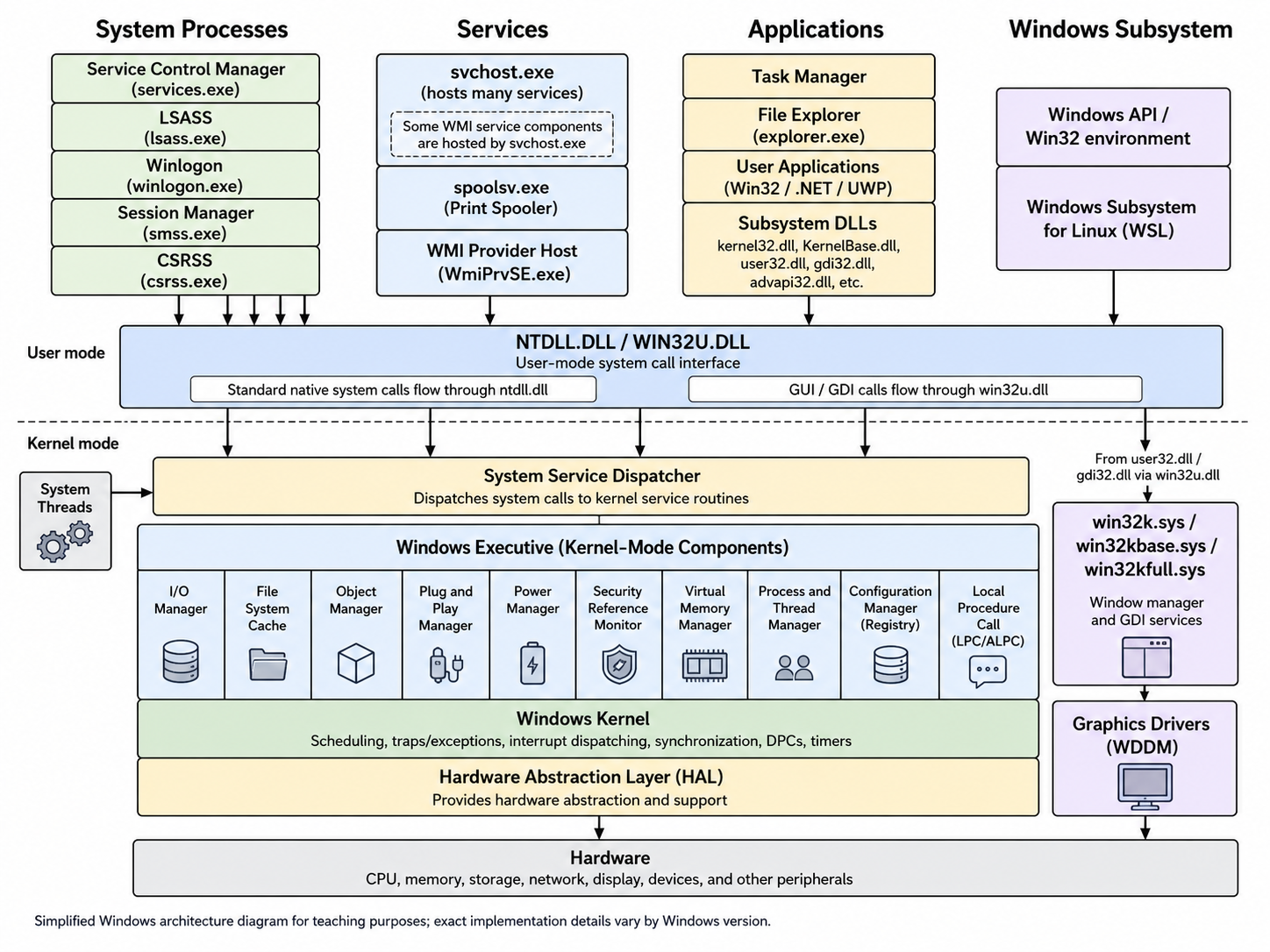
The diagram below shows a simplified version of the Windows architecture and the transition from user mode to kernel mode.
The main components shown in the diagram are explained below:
System Processes - These are important Windows processes that support the operating system itself. Examples include the Service Control Manager, lsass.exe, winlogon.exe, smss.exe, and csrss.exe. Although these processes are part of the operating system, they still execute in user mode. This is an important distinction because not every operating system component runs in kernel mode.
Services - Windows services are background programs that usually run without direct user interaction. Examples include services hosted by svchost.exe, the Print Spooler service running as spoolsv.exe, and WMI components such as WmiPrvSE.exe. Services are commonly used by Windows itself, third-party software, endpoint security products, and enterprise management tools.
Applications - Applications are normal user-mode programs. Examples include Task Manager, File Explorer, PowerShell, Microsoft Word, Google Chrome, or custom programs compiled during this course. Applications commonly call functions exported by subsystem DLLs such as kernel32.dll, KernelBase.dll, user32.dll, gdi32.dll, advapi32.dll, and others. These DLLs expose many functions from the Windows API. For example:
Windows Subsystem - The Windows subsystem provides the environment that most Windows applications use. This includes the Win32 API environment, which exposes the APIs commonly documented under the Windows API. Modern Windows can also provide other user-mode environments, such as the Windows Subsystem for Linux (WSL). These environments still rely on controlled interfaces when they need services from the operating system.
Ntdll.dll and Win32u.dll - ntdll.dll and win32u.dll are low-level user-mode DLLs involved in transitioning requests from user mode into kernel mode. ntdll.dll exposes lower-level Native API routines. Microsoft documents some of these routines in the Windows SDK and WDK documentation, including:
For many standard system operations, ntdll.dll contains the syscall stub that prepares the system call and transfers execution into kernel mode. win32u.dll is used for many GUI and GDI-related system calls. For example, higher-level GUI functions exposed through user32.dll and gdi32.dll may eventually reach win32u.dll before entering kernel mode.
System Service Dispatcher - After a syscall enters kernel mode, the System Service Dispatcher routes the request to the appropriate kernel service routine. This dispatcher acts as the kernel-side entry point for many services requested by user-mode code.
Windows Executive Components - The Windows Executive contains several major kernel-mode managers responsible for core operating system functionality. These include the I/O Manager, Object Manager, Plug and Play Manager, Power Manager, Security Reference Monitor, Virtual Memory Manager, Process and Thread Manager, Configuration Manager, and Local Procedure Call components. These components are responsible for handling many important operating system tasks, including file operations, handle management, object access, memory management, process and thread creation, registry access, security checks, and communication between processes.
Window Manager, GDI, and Graphics Drivers - GUI and graphics-related operations follow a related but separate path. Calls from user32.dll and gdi32.dll can enter kernel mode through win32u.dll and reach kernel-mode components such as win32k.sys, win32kbase.sys, and win32kfull.sys. These components are responsible for window management and GDI services. Graphics drivers then interact with the display hardware through the Windows Display Driver Model, or WDDM.
Windows Kernel - The Windows kernel provides low-level operating system functionality such as scheduling, interrupt handling, exception handling, synchronization, timers, traps, and Deferred Procedure Calls, also known as DPCs. The Windows kernel image is stored on disk as ntoskrnl.exe under C:\Windows\System32\ntoskrnl.exe.
Hardware Abstraction Layer and Hardware - The Hardware Abstraction Layer, or HAL, provides an abstraction between Windows and the underlying hardware platform. Below the HAL is the physical hardware itself, including the CPU, memory, storage devices, network adapters, display devices, buses, interrupts, and other peripherals.